
Crypto
Best Laptop Under $1000 in the USA (2025 Buyer’s Guide)


Buying a laptop in 2025 doesn’t have to mean spending a fortune. The sweet spot for most users—students, professionals, and creators alike—sits right around $1000. At this price, you can get premium build quality, excellent performance, and long battery life without jumping into the $1500+ flagship range.
Whether you’re a gamer, a remote worker, or a multitasking student, this guide on the best laptops under $1000 in the USA will help you make a smart choice for your budget and needs.
💡 Why $1000 Is the Smart Budget for a Laptop in 2025
Laptops priced under $500 can handle basic tasks, but they often cut corners on display quality, performance, or storage. By stretching your budget to under $1000, you unlock:
- ✅ High-performance processors (Intel Core i5/i7 or AMD Ryzen 5/7)
- ✅ Fast SSD storage and 16GB RAM for multitasking
- ✅ Premium build quality — metal chassis, backlit keyboards, and sturdy hinges
- ✅ Vibrant displays (Full HD or even 2.5K resolution)
- ✅ Better battery life and cooling systems
Simply put: this price range delivers long-term value and makes sure your device stays fast and reliable for years.
🔍 What to Look for Before Buying
Before you hit that “Buy Now” button, keep these specs in mind:
| Feature | What You Should Aim For | Why It Matters |
|---|---|---|
| Processor (CPU) | Intel Core i5/i7 (12th–13th Gen) or AMD Ryzen 5/7 (7000 Series) | Delivers power for gaming, editing, and multitasking. |
| RAM | 16GB DDR4/LPDDR5 | Future-proofing and smooth performance under load. |
| Storage | 512GB SSD (or higher) | SSDs offer lightning-fast boot and app load times. |
| Display | Full HD (1920×1080) or higher, IPS/OLED | Crisp visuals, color accuracy, and better viewing angles. |
| Battery | 8–12 hours average | Portability without worrying about charging. |
| Ports | USB-C, HDMI, SD slot (optional), headphone jack | Ensures compatibility with accessories and monitors. |
🏆 Top 5 Best Laptops Under $1000 in the USA (2025 Edition)
Let’s look at some of the top-performing laptops available in the U.S. for less than $1000 this year.
🥇 Apple MacBook Air M2 (2022–2023 Model)
Best for: Professionals, students, and creators who want top performance in a thin package.
- 💰 Price: Around $999
- ⚙️ Specs: Apple M2 Chip, 8GB RAM, 256GB SSD, 13.6″ Retina Display
- 🔋 Battery Life: Up to 18 hours
- ⭐ Why It’s Great:
The M2 MacBook Air delivers flagship-level performance, superb display quality, and unbeatable battery life—all under $1000. It’s quiet (fanless), lightweight, and ideal for productivity, design, or light editing.
Cons: Limited base storage (256GB), no touchscreen.
🥈 Dell XPS 13 (2023)
Best for: Style and portability.
- 💰 Price: $899–$999
- ⚙️ Specs: Intel Core i7-1250U, 16GB RAM, 512GB SSD, 13.4″ FHD+ Display
- 🔋 Battery Life: Up to 12 hours
- ⭐ Why It’s Great:
The XPS 13 remains a gold standard for build quality. With its aluminum design, ultra-thin bezels, and stunning display, it’s a premium choice for professionals on the go.
Cons: Ports are limited (mostly USB-C), no HDMI port.
🥉 ASUS ZenBook 14 (2024)
Best for: Productivity and everyday multitasking.
- 💰 Price: Around $899
- ⚙️ Specs: AMD Ryzen 7 7840U, 16GB RAM, 512GB SSD, 14″ 2.5K OLED Display
- 🔋 Battery Life: Up to 13 hours
- ⭐ Why It’s Great:
It’s light, fast, and has one of the best displays in its class. The ZenBook series is known for smooth multitasking, strong battery life, and excellent value for money.
Cons: Speakers are average; webcam could be better.
🎮 Acer Nitro 5 (2024)
Best for: Entry-level gaming on a budget.
- 💰 Price: Around $999
- ⚙️ Specs: Intel Core i5-13450HX, NVIDIA RTX 4050, 16GB RAM, 512GB SSD, 15.6″ FHD 144Hz Display
- 🔋 Battery Life: 6–8 hours
- ⭐ Why It’s Great:
If gaming is your goal, the Nitro 5 is unbeatable in this price bracket. It can handle AAA titles at medium to high settings while staying cool thanks to Acer’s dual-fan cooling system.
Cons: Slightly heavier; not ideal for portability.
🖥️ HP Pavilion Aero 13 (2024)
Best for: Students and office professionals.
- 💰 Price: Around $849
- ⚙️ Specs: AMD Ryzen 7 7735U, 16GB RAM, 512GB SSD, 13.3″ 2.5K Display
- 🔋 Battery Life: 10–12 hours
- ⭐ Why It’s Great:
Extremely lightweight (under 1kg) with great battery life and solid performance. Perfect for students, writers, and travelers who prioritize portability.
Cons: No dedicated GPU for gaming.
🔧 Comparison at a Glance
| Model | CPU | RAM | Storage | Display | Battery | Best For |
|---|---|---|---|---|---|---|
| MacBook Air M2 | Apple M2 | 8GB | 256GB | Retina | 18 hrs | Overall performance |
| Dell XPS 13 | Intel i7 | 16GB | 512GB | FHD+ | 12 hrs | Portability |
| ASUS ZenBook 14 | Ryzen 7 | 16GB | 512GB | OLED | 13 hrs | Productivity |
| Acer Nitro 5 | i5 + RTX 4050 | 16GB | 512GB | 144Hz | 7 hrs | Gaming |
| HP Pavilion Aero 13 | Ryzen 7 | 16GB | 512GB | 2.5K | 11 hrs | Students/Work |
🔋 Battery Life & Portability — What to Expect
If you’re a student or frequent traveler, go for a lightweight laptop with at least 10+ hours of battery life like the MacBook Air or HP Aero.
For gamers or heavy users, prioritize performance over portability. Gaming laptops like the Acer Nitro 5 trade battery life for power, but they’re unbeatable in raw performance under $1000.
🌐 Where to Buy the Best Laptops Under $1000
Here are reliable sources to shop in the USA:
- Amazon.com – Best deals and frequent discounts.
- BestBuy.com – Trusted retailer with student deals and protection plans.
- Dell.com, HP.com, ASUS.com – Buy directly for warranty coverage and customization.
- B&H Photo, Newegg, Walmart – Good for refurbished or special bundles.
Always compare prices and check for holiday or back-to-school discounts — laptops often drop below $900 during sale events.
🧠 Expert Tips Before Buying
- Avoid outdated CPUs (e.g., Intel 10th Gen or earlier) — newer chips are more power-efficient.
- Look for upgrade options (extra RAM slots or SSD ports) for longevity.
- Don’t ignore screen quality — an OLED or IPS display makes a massive difference for comfort.
- Prioritize balance over specs — not every task needs a gaming GPU.
- Check customer reviews and real benchmarks before buying.
🏁 Conclusion
The best laptops under $1000 in the USA offer the perfect balance between price, performance, and portability. Whether you pick the sleek MacBook Air M2, the stylish Dell XPS 13, or the powerful Acer Nitro 5, you’ll be getting excellent long-term value without overspending.
💬 Final Tip:
Always choose based on your needs. A student, a creator, and a gamer will all define “best” differently — but under $1000, there’s a perfect laptop waiting for everyone.
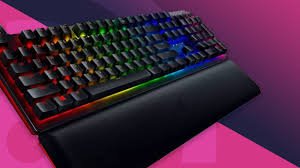
A $200 budget for a gaming keyboard lands you in a sweet spot: you can expect premium materials, high-end switches, more advanced customization, and the kind of durability that lasts years. Whether you’re a competitive FPS player, an MMO macro wizard, or a hybrid creator/gamer, this guide explains what really matters and how to choose the best gaming keyboard under $200 in the USA — without wasting money on features you won’t use.
Why the $200 Range Is Worth It
At this price point you’re buying build quality and longevity rather than gimmicks. Typical advantages include:
- High-quality mechanical switches (often branded switches with long lifespans).
- Solid metal top plates or thicker composites that reduce flex.
- Reliable wireless options with low-latency dongles.
- Per-key RGB with deep customization and onboard profile memory.
- Hot-swap sockets, superior stabilizers, & PBT keycaps on many models.
In short: you get a keyboard that feels premium, performs consistently, and stands up to heavy daily use.
What to Prioritize — Key Features Explained
1. Switch Type (The Heart of the Experience)
Switches change everything: feel, speed, sound, and typing comfort.
- Linear: Smooth and quiet — excellent for fast flicks in FPS games.
- Tactile: A subtle bump on actuation makes these great for mixed typing and gaming.
- Clicky: Loud, satisfying clicks — great for typists but noisy for shared spaces.
At this budget you’ll often find Cherry MX, Kailh, Gateron, or proprietary premium switches. Consider hot-swappable boards if you like experimenting with different switches.
2. Build & Materials
Look for aluminum or thick steel top plates, sturdy frames, and well-seated stabilizers. PBT keycaps resist shine and feel nicer than ABS. A heavy, rigid chassis reduces wobble and improves typing consistency.
3. Form Factor & Layout
- Full-size (104 keys): Good for MMOs and productivity.
- TenKeyLess (TKL): Popular for FPS players who want more mouse space.
- 75% / 65% / 60%: Compact layouts save desk space and look slick — trade off some dedicated keys.
Pick the layout that matches your desk space and hotkey needs.
4. Wired vs Wireless
- Wired: Lowest latency and simplest setup — still the go-to for esports.
- Wireless (2.4 GHz dongle or Bluetooth): At this price, you can find wireless keyboards with performance rivaling wired ones. Check for low-latency dongle mode, rechargeable battery life, and fast charging.
5. Software & Customization
Good software matters: programmable macros, easy key remapping, RGB layers, and onboard profile storage let you tailor the keyboard to games and workflows. Prefer simple, stable software with frequent updates.
6. Ergonomics & Extras
- Detachable wrist rests (magnetic is clean).
- Angle/tilt options and comfortable keycap profiles (OEM, Cherry).
- Dedicated macro keys or integrated knob/dial can be a productivity boost.
Performance Features That Impact Gameplay
- Polling Rate: 1000 Hz is standard for pro responsiveness.
- Anti-ghosting / NKRO: Ensures every keypress registers during intense combos.
- Stabilizers: Well-lubed, properly mounted stabilizers remove rattle on larger keys.
- Onboard Memory: Saves profiles so your settings travel with the keyboard.
Sound & Feel — Tuning Your Experience
At this level you can tune the keyboard’s acoustics: switch dampeners, factory lubed switches, and foam dampening inside the case all reduce hollowness and produce a satisfying tone. If you stream or share space, test or read about noise characteristics before buying.
Who Each Keyboard Type Suits Best
- Competitive FPS Players: TKL or 65% with linear switches, 1000 Hz polling, and a lightweight but rigid frame.
- MMO/Strategy Players: Full-size with dedicated macro keys and tactile switches for reliable presses.
- Content Creators / Streamers: Premium keycaps, media controls (knobs), and strong wireless options for clean setups.
- Hybrid Users (work + play): Tactile switches, full layout or TKL depending on numpad need, and ergonomic wrist support.
Typical Tradeoffs to Expect
Even under $200 you won’t get everything — weigh tradeoffs:
- Ultra-luxury boutique keyboards (custom CNC cases, exotic materials) cost more.
- Top-tier wireless battery life still often requires some compromise for lower weight.
- Extreme macro ecosystems may be limited to specialist models.
But for most buyers, a well-chosen keyboard under $200 balances these tradeoffs beautifully.
Sample Buying Checklist (Use When Comparing Models)
- Switch type & rating (clicks lifespan)
- Hot-swap sockets (yes/no)
- PBT keycaps or high-quality ABS
- NKRO / 1000 Hz polling rate
- Aluminum or rigid steel top plate
- Onboard profile memory + software stability
- Detachable wrist rest and solid stabilizers
- Wireless low-latency mode (if wireless)
- Warranty & support (1–3 years)
How to Test Before You Buy (If Possible)
If you can visit a store or try at a friend’s place:
- Test the feel of the switches for 10–15 minutes (typing, gaming).
- Check stability by applying gentle pressure; no flexing or creaks.
- Try macros and software setup (if demo is available) to ensure the interface feels intuitive.
- Listen for scroll wheel and key click noise — find what suits your environment.
Final Thoughts — Make Your $200 Count
The best gaming keyboard under $200 should feel tailored to your hands and your games. Prioritize switch quality, build rigidity, and a layout that matches your use, then layer on extras like hot-swap sockets, PBT keycaps, and low-latency wireless if they matter to you. In this price range you’re buying a peripheral that can be a long-term centerpiece of your setup — choose carefully, and it will repay you in comfort and precision.
Want model recommendations matched to your hand size, grip style, and favorite games? Tell me those details and I’ll suggest three specific keyboards that fit your exact needs.
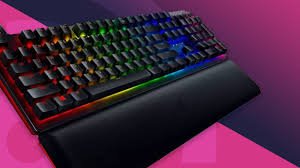
A great gaming keyboard is one of the most impactful upgrades you can make to your PC setup. For under $100, you can get a keyboard with tactile switches, customizable lighting, solid build quality, programmable macros, and features that seriously improve comfort and responsiveness. This guide walks you through everything you need to know to pick the best gaming keyboard under $100 in the USA: how to compare options, which features matter most, recommended types, and practical buying tips so you get the most value for your money.
Why $100 Is a Sweet Spot for Gaming Keyboards
At this price point you typically get real mechanical switches (or very good hybrid designs), strong construction, and software support that lets you tailor the keyboard to your playstyle. You don’t get the ultra-premium boutique materials of $200+ boards, but you do get performance that feels—and plays—like a pro keyboard for most gamers.
Mechanical vs Membrane: Which Should You Choose?
- Mechanical (recommended): Uses individual mechanical switches under each key. Offers superior tactile feedback, faster actuation, longer lifespan, and easy customization. Mechanical keyboards are the standard for competitive gaming.
- Membrane / Hybrid: Softer, quieter, and often cheaper. Good for casual gamers or shared workspaces. Newer hybrid designs (mechanical feel with membrane cost) are improving but usually can’t match mechanical durability or feel.
If you’re serious about gaming, aim for a mechanical keyboard—many excellent options under $100.
Key Features That Matter Most
1. Switch Type & Feel
Switches determine how the keyboard feels and performs. Common categories:
- Linear (smooth, no click) — ideal for fast double-taps and FPS flicks.
- Tactile (bump on actuation) — good balance for typing and gaming.
- Clicky (tactile + audible click) — satisfying feedback but noisier.
Popular switch brands include Cherry, Gateron, Kailh, and Outemu. Under $100, you’ll often find Gateron or Kailh switches providing excellent value.
2. Key Rollover & Anti-Ghosting
Look for NKRO (n-key rollover) or at least 6-key rollover. These features ensure multiple simultaneous key presses register correctly—critical for complex in-game inputs.
3. Build Quality
- Frame: Aluminum top plates add rigidity; reinforced plastic can be perfectly fine if well-designed.
- Keycaps: PBT keycaps resist shine and last longer than ABS. Many keyboards in this range still ship with ABS, but PBT is a bonus.
- Stabilizers: Good stabilizers reduce rattling on larger keys (spacebar, enter).
4. Form Factor
- Full-size (104 keys): Has number pad—great for productivity and some MMOs.
- Tenkeyless (TKL, 87 keys): Removes numpad for better mouse space; popular for FPS players.
- 75% / 65% / 60% compact: Save desk space and look minimalist; compact layouts trade off dedicated keys for a tighter footprint.
Choose based on desk space and whether you need a numpad.
5. Wired vs Wireless
- Wired: Lowest latency and no battery to worry about—preferred for competitive play.
- Wireless (2.4 GHz or Bluetooth): Clean desk and portability; check for low-latency 2.4 GHz dongles and long battery life if you choose wireless.
6. RGB & Backlighting
RGB is mostly cosmetic but useful for visibility in low light and for keybinding cues. Quality lighting with per-key customization is a plus—but don’t pick a keyboard for RGB alone.
7. Programmability & Software
Good software enables macro recording, custom lighting, and profile switching. Look for user-friendly software and onboard profile storage so your settings travel with the keyboard.
8. Hot-Swappable Switches (Optional)
Hot-swap sockets let you change switches without soldering—great if you want to experiment. Some sub-$100 keyboards include this feature and it’s an excellent long-term value.
Types of Gamers & Recommended Keyboard Styles
- FPS / Competitive Players: Choose a TKL or 60% mechanical keyboard with linear or low-travel tactile switches, 1000Hz polling, and minimal macro gimmicks.
- MMO / MMO-Actions: Full-size or TKL with extra programmable buttons or macro layers. Durable switches and robust software are essential.
- Streamer / Content Creators: Look for programmable keys, per-key RGB (for visual cues), and a comfortable wrist rest. Wireless can be a plus for staging.
- Hybrid (work + play): A tactile switch option and a full-size layout offer the best compromise for typing and gaming.
Practical Buying Tips
- Try switches if you can—local stores or friends let you test different feels.
- Prioritize switch and build quality over flashy RGB if you must choose.
- Check firmware support and driver software—ongoing updates matter.
- Look for user reviews about noise and durability—real users call out stabilizer issues or early switch failures.
- Consider warranties and return policies—a 1–2 year warranty is common and recommended.
- Watch for sales—gaming keyboards often drop below sticker price during seasonal promotions.
Quick Buying Checklist
- Mechanical switches (or hybrid if you prefer quiet)
- At least 6KRO, preferably NKRO
- Durable construction with minimal flex
- Anti-ghosting + 1000Hz polling rate (for serious gamers)
- Software for key mapping & macro support
- PBT keycaps and hot-swap sockets are bonuses
- Comfortable layout for your grip and desk space
FAQs
Q: Are more expensive switches worth it?
A: Higher-end switches and premium stabilizers feel nicer and last longer, but many mid-range switches today are excellent—especially if you pair them with good keycaps and a solid frame.
Q: Is wireless okay for competitive gaming?
A: Modern 2.4 GHz wireless keyboards can be as responsive as wired ones, but wired is still the safest choice for pro-level play or tournaments.
Q: What’s the lifespan of a mechanical keyboard?
A: Most mechanical switches are rated for 50–100 million keystrokes. With normal use, a good keyboard can last many years.
Final Thoughts
Under $100 you can find a gaming keyboard that provides professional-level responsiveness, satisfying tactile feedback, and helpful customizability. Prioritize switch type, build quality, and layout to match your playstyle, and look for extras like hot-swap sockets or PBT keycaps if you want longevity and customization. With so many solid options available, this price bracket is one of the best places to get maximum performance for your money.
If you tell me your preferred game genre, hand size, and whether you want wireless, I’ll recommend three specific keyboard styles and feature sets tailored to your needs.
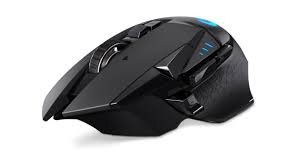
A great gaming mouse is one of the single biggest upgrades you can make to your gameplay. At the under $100 price point you get a sweet balance: premium sensors, solid ergonomics, programmable buttons, and features that used to be reserved for flagship peripherals. This guide is a fully original, human-written look at what to expect, what to prioritize, and how to pick the best gaming mouse under $100 in the USA for your playstyle.
Why spend up to $100 on a gaming mouse?
Spending up to $100 opens doors you won’t find in the truly budget range:
- Top-tier optical sensors with low latency and reliable tracking.
- Comfortable, refined shapes designed for long sessions.
- Better switches with higher click lifespans.
- Onboard memory & customization software for DPI, button mapping, and macros.
- Wireless options with low-latency dongles that rival wired performance.
If you play competitively, stream regularly, or use your PC for long daily sessions, a sub-$100 mouse is an investment in consistency and comfort.
Key features to prioritize
When comparing models, focus on these attributes — they determine real-world performance more than flashy marketing.
1. Sensor quality
A true optical sensor (not a low-end infrared) with accurate tracking, low jitter, and configurable DPI is essential. Look for sensors that advertise consistent tracking across surfaces and low lift-off distance if you use quick flick shots.
2. Polling rate & latency
A 1000 Hz polling rate (or selectable 125/500/1000 Hz) is standard in this bracket and provides smooth, responsive input. For wireless mice, check that the dongle mode offers comparable latency to wired.
3. Shape, size & grip compatibility
Ergonomics matter. Match the mouse to your grip and hand size:
- Palm grip: larger, rounded back for full-hand support.
- Claw grip: medium size with a pronounced hump near the rear.
- Fingertip grip: smaller, lighter mice with compact profiles.
Measure your hand (length and width) and read dimensions when possible.
4. Buttons & customization
At least two side buttons are common, but more programmable buttons are helpful for MMO/MOBA players. Check whether the software allows easy remapping and macro recording, and if the mouse stores profiles onboard.
5. Build quality & switches
Mechanical switches rated for 20–70 million clicks are typical. A sturdy scroll wheel, firm side buttons, and a stable shell make a mouse feel premium over time.
6. Weight & balance
Some prefer ultra-lightweight (sub-70 g) mice for fast flicks; others like a heavier mouse for controlled tracking. Removable weight systems are a nice-to-have but not required.
7. Wireless vs wired
Wired mice still offer the best value for latency-sensitive players. Modern wireless mice with a 2.4 GHz dongle or proprietary low-latency mode can match wired performance — and provide cable freedom. Battery life and recharge time are major considerations for wireless.
8. Software & driver support
Good software lets you change DPI steps, customize RGB, program buttons, configure lift-off distance, and save profiles. Clean, supported software is worth more than extra buttons on a poorly-supported device.
Types of gamers and the mouse that fits them
- FPS Competitors: lean, lightweight, high-polling-rate mice with minimal smoothing. Prioritize sensor integrity and low latency.
- MOBA / MMO Players: ergonomic mice with multiple programmable side buttons and onboard memory for macros.
- Casual & Streamers: comfortable, attractive mice with balanced features, reliable sensors, and good looks (RGB optional).
- Content Creators: mice with dedicated profile switching and precise tracking for editing and productivity shortcuts.
Practical buying tips
- Try before you buy, if possible. Shape and comfort are subjective.
- Check hand-size charts provided by manufacturers or reviewers.
- Wired for pros, wireless for comfort, unless a wireless model offers proven low-latency performance.
- Prioritize sensor and shape over RGB or marketing extras.
- Look for on-sale deals — many mice fall under $100 during promotions.
- Read user reviews for long-term durability (scroll wheel, side-button reliability).
- Consider warranty and customer support — reputable brands often provide robust service.
Recommended feature checklist (quick)
- True optical sensor with adjustable DPI (at least 400–16,000 DPI range)
- Polling rate: up to 1000 Hz selectable
- Ergonomic design matching your grip style
- 2–8 programmable buttons with macro support
- Durable mechanical switches (20M+ clicks)
- Wired braided cable or wireless 2.4 GHz low-latency mode
- Onboard memory for saving profiles (optional but nice)
- Reliable software for customization
Example picks by category (what to look for in models)
Best for FPS: A lightweight, wired or low-latency wireless mouse with an excellent optical sensor, minimal smoothing, and a responsive 1000 Hz polling rate. Look for simple, ergonomic shapes and tight tolerances in the buttons and scroll wheel.
Best for MMOs / MOBAs: A mouse with multiple side buttons (or a comfortable thumb grid), on-the-fly DPI switching, and solid macro software. Comfort and button placement are more important than ultra-low weight.
Best wireless under $100: A mouse with a dedicated 2.4 GHz dongle, confirmed sub-2ms latency in dongle mode, and at least 30–50 hours battery life with RGB off (or longer in power-saving profiles).
Best ambidextrous / left-handed friendly: Symmetrical shapes with side buttons accessible from both sides or removable buttons. Pure ambidextrous mice are rarer in the under-$100 range but do exist.
Common FAQs
Q: Will a $100 mouse make me better at games?
A: It won’t magically improve skill, but better tracking, comfort, and customization help you play more consistently and reduce fatigue — which improves performance over time.
Q: Is wireless safe for competitive play?
A: Yes — modern wireless gaming mice with low-latency dongles are competitive-grade. That said, many pros still prefer wired for absolute consistency.
Q: How long should a good mouse last?
A: With normal use, a well-built mouse can last 3–5 years or longer. Switch lifespans, build quality, and how you treat the mouse determine longevity.
Q: Are high DPI numbers important?
A: Absolute DPI numbers are less important than the sensor’s true tracking performance. High DPI offers headroom, but most players use much lower DPI settings combined with in-game sensitivity.
Final thoughts
The best gaming mouse under $100 is the one that fits your hand, matches your playstyle, and offers a reliable sensor with customization you understand. At this price point you can expect performance close to pro-level gear — just take the time to match shape and features to how you play. If you want, tell me your hand size, grip style, and favorite game genre, and I’ll recommend specific models and exact specifications tailored to you.

Best Gaming Keyboard Under $200 in USA — The 2025 Buyer’s Guide

Best Gaming Keyboard Under $100 in USA — The Complete 2025 Buyer’s Guide

Best Gaming Mouse Under $100 in USA — A Practical, Human Guide (2025)

FintechZoom.com Nickel – Exploring Nickel Prices and Market Trends in the Digital Age
Best Gaming Keyboard Under $200 in USA — The 2025 Buyer’s Guide

How to Become a Pro in Gaming: The Ultimate Guide to Leveling Up Your Skills
-
 Crypto6 months ago
FintechZoom.com Nickel – Exploring Nickel Prices and Market Trends in the Digital Age
-
Crypto5 months ago
Best Gaming Keyboard Under $200 in USA — The 2025 Buyer’s Guide
-
 Crypto6 months ago
How to Become a Pro in Gaming: The Ultimate Guide to Leveling Up Your Skills
-
 Crypto6 months ago
Best Laptop Under $500 in USA — Your Complete 2025 Buying Guide
-
Crypto5 months ago
Best Gaming Keyboard Under $100 in USA — The Complete 2025 Buyer’s Guide
-
 Crypto5 months ago
Best Gaming Tables Under $500 in USA — The Complete 2025 Buying Guide
-
Crypto5 months ago
Best Gaming Mouse Under $100 in USA — A Practical, Human Guide (2025)
-
 Crypto5 months ago
Best Gaming Tables Under $1000 in USA — The Ultimate 2025 Buying Guide